Data Cleansing & Verification
Why Dirty CRM Data Is Quietly Killing Your Sales Pipeline
Last Updated: June 24, 2026 | Editorial Team
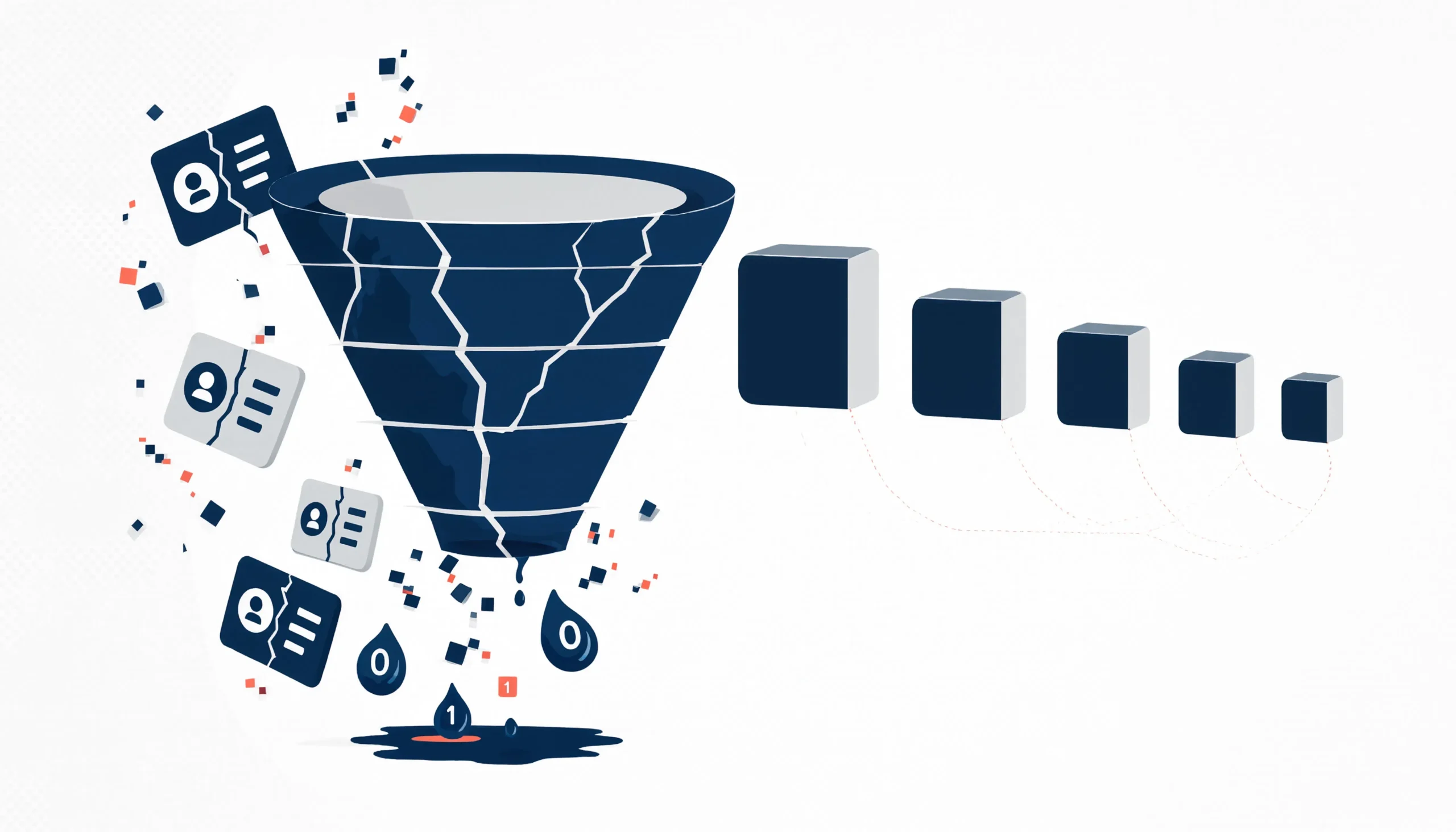
Quick Answer: Dirty CRM data doesn’t announce itself. It just makes everything slightly worse, month after month – higher bounce rates, reps spinning their wheels, pipeline numbers that look fine until they don’t. By the time someone connects the dots, you’ve already burned budget, time, and goodwill you’re not getting back.
Nobody’s first instinct when a campaign underperforms is “our CRM data is probably bad.”
They tweak the subject line. They question the targeting. They wonder if the offer was right. They run an A/B test. Occasionally they blame the SDR team for not following up fast enough.
The data? It stays untouched. Because fixing it sounds boring, and the connection between “stale contact records” and “missed quarter” is never quite obvious enough to make it feel urgent.
That’s exactly why it’s such an effective way to quietly wreck a pipeline. It’s slow, invisible, and very easy to blame on something else.
What is technographic data?
Technographic data enables ABM teams to identify and engage accounts that are technically ready for their solution. Instead of targeting companies only by size or industry, technographic insights reveal what tools and platforms an account already uses, making targeting more precise and relevant.
In ABM, success depends on quality over volume. Many campaigns fail because accounts look ideal on paper but lack the right technology environment. Technographic data fills this gap by showing whether an account uses competing tools, complementary software, or outdated systems—allowing marketers to focus on accounts with real potential.
The math is worse than you think
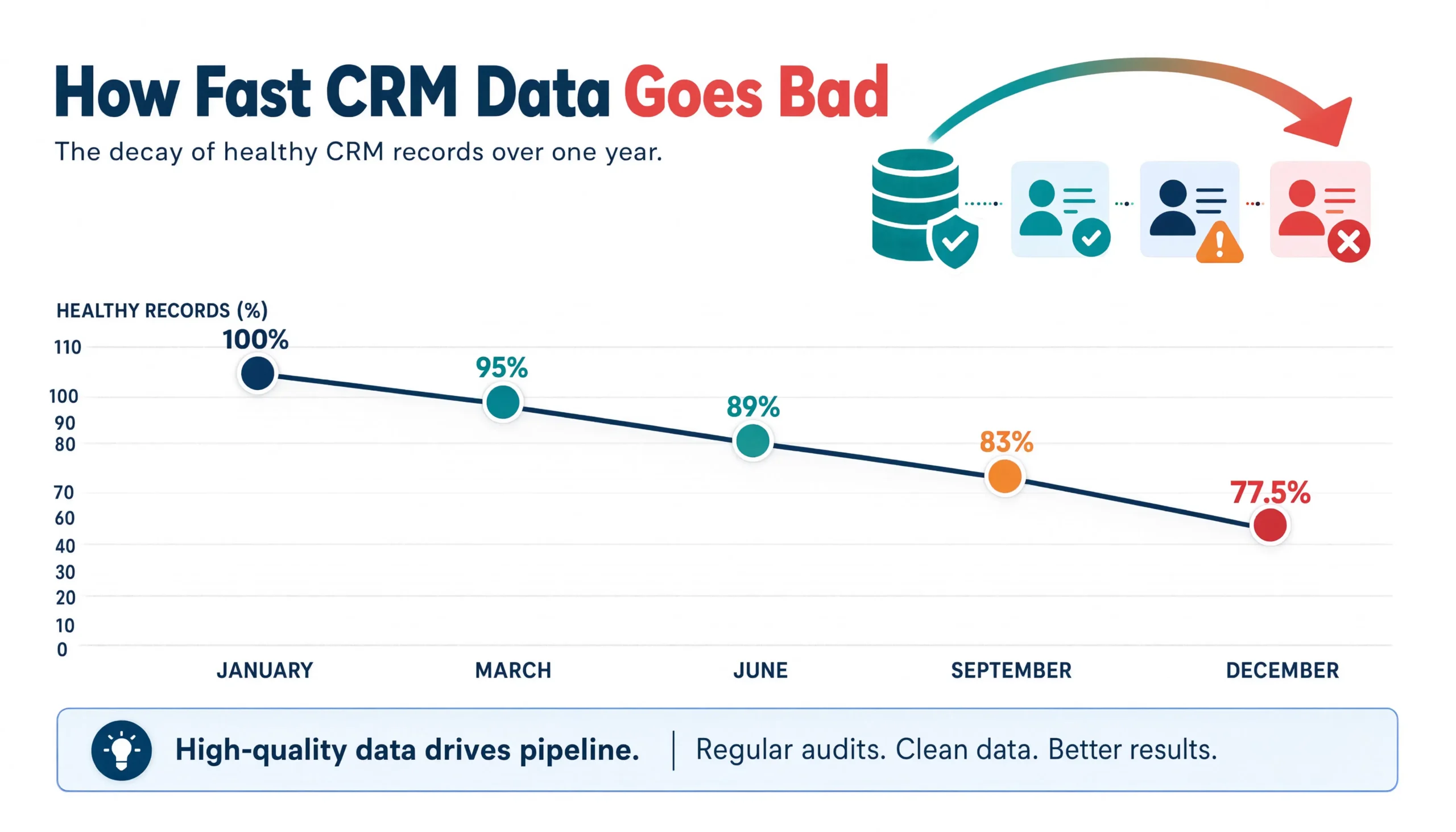
Here’s a number worth sitting with: B2B contact data decays at about 2.1% per month that compounds to roughly 22.5% per year. So if you had a perfectly clean CRM on January 1st – every email valid, every title current, every company record accurate – by December you’d have roughly a quarter of your database quietly broken, through no fault of your own.
That’s just people changing jobs, companies getting acquired, phone numbers getting reassigned, org structures shifting. Normal business activity. Your CRM just doesn’t know.
Now add on top of that the dirty CRM data quality issues that are your team’s fault – duplicate records from list imports, inconsistent company naming, contacts with blank fields, three reps who each created a record for the same account without realizing it – and the picture gets worse.
Salesforce’s own research found that 91% of CRM data is incomplete, stale, or duplicated at any given time. This is Salesforce saying this about their own customers. It’s not a fringe finding from a vendor with something to sell. It’s just what happens when you treat a CRM like a place to store information rather than a system that needs maintenance.
Where it actually shows up
The damage from bad data rarely concentrates in one place. It spreads across everything and usually gets misdiagnosed as something else.
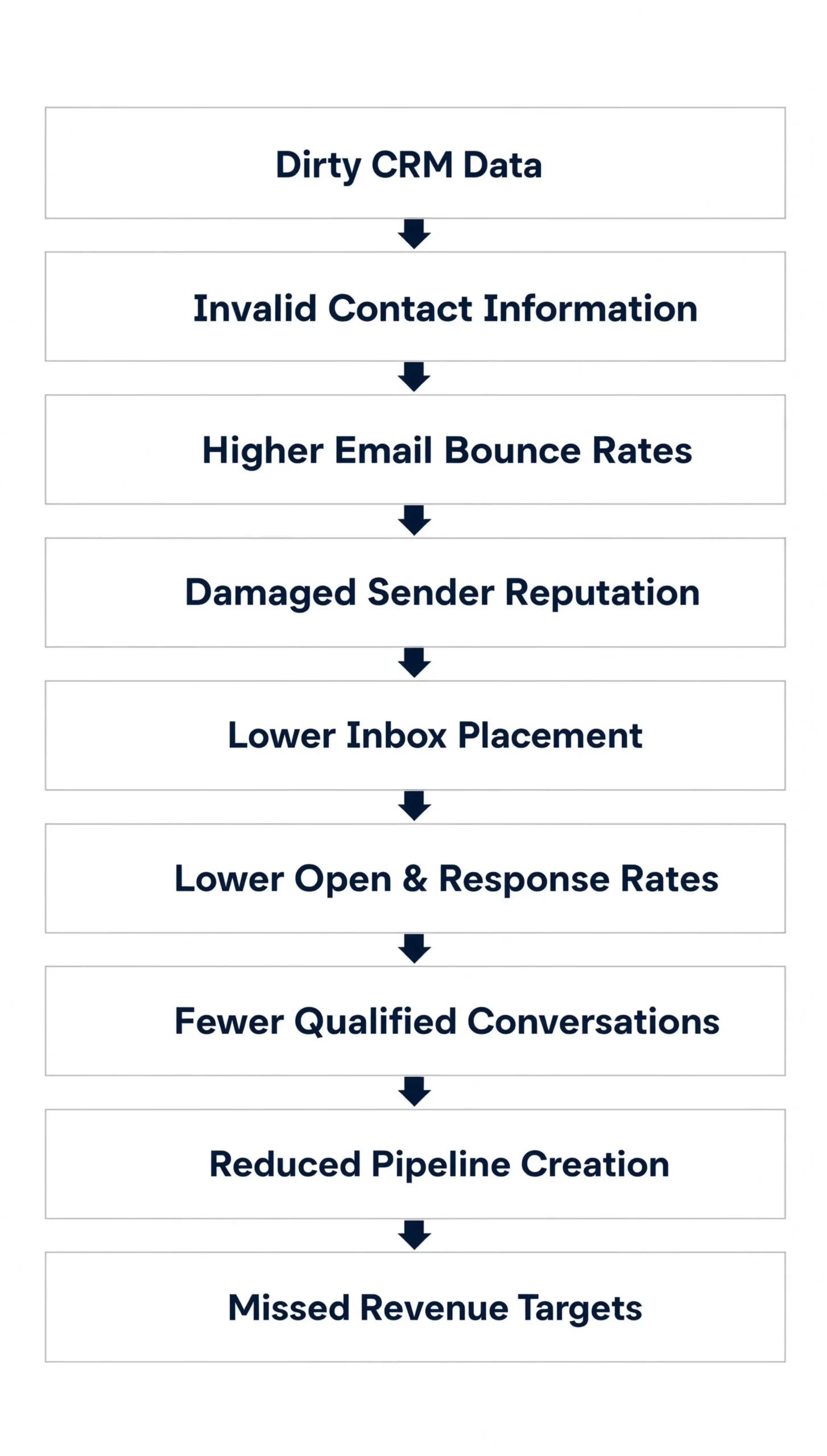
Email performance. A hard bounce rate above 2-3% on a properly built, opted-in list is almost always a data quality problem, not a copy problem. But more importantly, those bounces don’t just hurt the campaign they happen in. They damage your sender reputation with email providers – and that reputation affects every campaign you run going forward. Your emails to perfectly good contacts start landing in spam. Open rates fall. You run more campaigns trying to compensate. The problem compounds.
Rep productivity. Reps spend more than a quarter of their time – some research puts it closer to 27% – dealing with the direct consequences of bad data. Wrong phone numbers, duplicate accounts they have to sort through, contacts they need to manually verify before a call. That’s not selling. Across a team of 10 reps, it’s roughly the equivalent of having three of them do nothing but clean up avoidable admin work all year.
This almost never gets named as a CRM data quality problem in performance reviews. It shows up as “activity numbers are low” or “not enough pipeline created.” The root cause stays invisible.
Your pipeline reports. Duplicate accounts are particularly nasty here. If the same company exists in your CRM under three different names because three different people created it at different points, it can show up three times in your pipeline. You’re reporting $900K. The actual number is $300K. Nobody catches this until the deal closes – or doesn’t.
Outdated firmographic data does something similar but slower. If a company in your CRM shows 50 employees and they’ve quietly grown to 500 over the past two years, your lead scoring is treating a mid-market account like a small business – the same failure mode that undermines ABM data quality when target account lists are built on outdated firmographics. Your segmentation is wrong. Your territory assignments are wrong. Every decision you’ve made based on that data is slightly off in a direction you can’t see.
Personalization that backfires. Sending an email to someone using their old job title at a company they left eight months ago doesn’t just go unanswered. It signals that you weren’t paying attention – which is the one impression you cannot afford to make with someone who gets 40 cold emails a week.
The Domino Effect of Dirty CRM Data
Why teams let it pile up
If all of this is true about dirty CRM data – and it is – why do most B2B companies let this go on for months or years before doing anything about it?
Because nobody owns it. CRM data quality sits in the exact gap between marketing ops, sales ops, and IT. All three teams know it matters. None of them have it on their quarterly goals. It gets bumped every time something more urgent comes up, which in a B2B company is approximately always.
And because the connection between dirty CRM data and bad outcomes is genuinely hard to trace. When a campaign bounces, you blame the copy or the list quality (which is the same thing, just vaguely stated). When reps miss quota, you look at their activity numbers. When pipeline is short, you ask whether you’re targeting the right ICPs. The CRM data is underneath all of it, and it’s the last thing anyone thinks to question.
There’s also a psychological thing happening cleaning it once feels like it should stick. Most teams do a real cleanup when they migrate CRMs or before a major campaign launch, declare victory, and assume the problem is solved. But data doesn’t stay clean. It starts decaying the day you fix it. Without an ongoing process, you’re back to the same problem within 12 months.
A quick way to check if this is already your problem
You don’t need a full audit to get a signal. Three things worth checking right now:
Pick your last email campaign. What was the hard bounce rate? Anything above 2% on a list you believe is healthy is a red flag.
Pull 50 random contact records from your CRM – not leads you’ve been actively working, just random ones. Check whether the person’s current title and company are still accurate. If more than 8 or 10 are wrong, the problem across your whole database is likely 20-30% or worse.
Search for a company you know well – a current customer, a big prospect – in your CRM. How many versions of it exist? Different capitalizations, different abbreviations, different entity names? Whatever that duplication pattern looks like, it almost certainly reflects what’s happening across the rest of your database.
If those three checks make you uncomfortable, the full picture is probably worse than what you found, not better.
5 Warning Signs Your CRM Needs Cleaning
Not sure how bad your dirty CRM data actually is? These five metrics are the clearest signal. Anything consistently landing in the “Warning” or “Critical” column means CRM data cleansing isn’t optional anymore – it’s overdue.
| Metric | Healthy | Warning | Critical |
|---|---|---|---|
| Bounce Rate | <2% | 2-5% | >5% |
| Duplicate Records | <5% | 5-10% | >10% |
| Missing Fields | <10% | 10-20% | >20% |
| Invalid Phone Numbers | <5% | 5-15% | >15% |
| Outdated Job Titles | <10% | 10-20% | >20% |
What actually fixes it
The honest answer is that there’s no one-time solution to this problem.
You need verification – SMTP-level email checks, carrier-level phone validation – not just syntax checking, which only catches obviously malformed addresses, not dead ones. You need company-level normalization so that “RP Tech Media,” “Right Pace Techmedia,” and “RPTechMedia LLC” stop being treated as three different accounts. This is CRM data cleansing done in the right order, which means normalizing first and deduplicating second, not the reverse. And you need someone actually owning the ongoing hygiene, not just running a cleanup when things get bad enough to notice.
The mechanics of doing this right are covered in detail in the Complete Guide to CRM Data Cleansing & Verification. If you want to understand what a proper process actually looks like, that’s the place to start.
If you’d rather start by seeing where your own database actually stands, we can do that too.
It doesn’t take much to find out if this is already costing you. The harder part is doing something about it before another quarter goes by.
FAQs
What is dirty CRM data?
Dirty CRM data refers to contact and account records that are outdated, duplicated, incomplete, or inaccurate – wrong job titles, dead emails, the same company entered under multiple names, or missing fields. It accumulates naturally as people change jobs and companies evolve, and it quietly degrades everything from email deliverability to pipeline reporting.
How much does CRM data decay each year?
B2B contact data decays at roughly 2.1% per month, compounding to about 22.5% per year. That means a perfectly clean database on January 1st will have close to a quarter of its records outdated or broken by December, purely from normal job changes and company turnover.
What's a healthy email bounce rate for CRM data quality?
A hard bounce rate under 2% is considered healthy on a properly opted-in list. Anything between 2-5% is a warning sign, and above 5% is critical. Bounce rates above 2-3% on a list believed to be healthy almost always point to a data quality problem, not a copy or targeting problem
How much time do sales reps lose to bad CRM data?
Some research puts it at around 27% of rep time – roughly a quarter of their week spent verifying wrong phone numbers, sorting through duplicate accounts, and manually checking contact details before calls. Across a 10-person sales team, that’s the equivalent of nearly three reps doing cleanup work full-time.
How do duplicate CRM records affect pipeline reporting?
When the same company exists under multiple names in your CRM, its pipeline value can get counted more than once. A deal reported as $900K might be worth $300K once duplicates are removed, and this often isn’t caught until a deal closes or a forecast falls short.
How often should you do CRM data cleansing?
CRM data cleansing shouldn’t be a one-time event tied to a migration or campaign launch – data starts decaying again immediately afterward. Ongoing verification, ideally continuous or at minimum quarterly, is needed to keep pace with the roughly 2% monthly decay rate in typical B2B databases.
How do I know if my CRM data quality is a problem?
Check three things: your last campaign’s hard bounce rate (above 2% is a red flag), a random sample of 50 contact records for outdated titles or companies (more than 8-10 wrong suggests a 20-30%+ database-wide issue), and how many duplicate versions exist for a company you know well.
Why does dirty CRM data go unfixed for so long?
Mainly because no single team owns it – it falls between marketing ops, sales ops, and IT, and none of them have it as a quarterly goal. It’s also hard to trace bad outcomes like low pipeline or missed quota usually get blamed on strategy or execution rather than the data underneath them.
Right Pace Techmedia Editorial Team
Right Pace Techmedia editorial team comprises B2B growth specialists and campaign strategists with over 7 years of hands-on experience delivering measurable pipeline results for globally recognized technology brands including Oracle, SAP, Salesforce, Siemens, and Lenovo. Having engineered over 1.8 million verified leads across lead generation, account-based marketing, data intelligence, and demand generation programs, our writers draw from real campaign outcomes not borrowed theory. Every article published on this blog reflects practitioner-level knowledge, reviewed by senior professionals who have managed complex B2B campaigns across industries, geographies, and buying committee structures. We write what we know because we’ve lived it.
Our Latest Bolgs

Why MSP Lead Generation Fails
Lead Generation Why Most MSP Lead Generation Falls Flat (And What Actually Works) Last Updated: Sept 09, 2026 | Editorial Team Most

B2B Lead Generation Strategies for 2026
Lead Generation 10 B2B Lead Generation Strategies That Actually Work in 2026 Last Updated: August 26, 2026 | Editorial Team B2B lead

FinTech Lead Generation Compliance Challenge
Lead Generation The Compliance Challenge in FinTech Lead Generation (And How to Solve It) Last Updated: August 19, 2026 | Editorial Team


